Write the purpose across your ID copy — in a form no one can alter
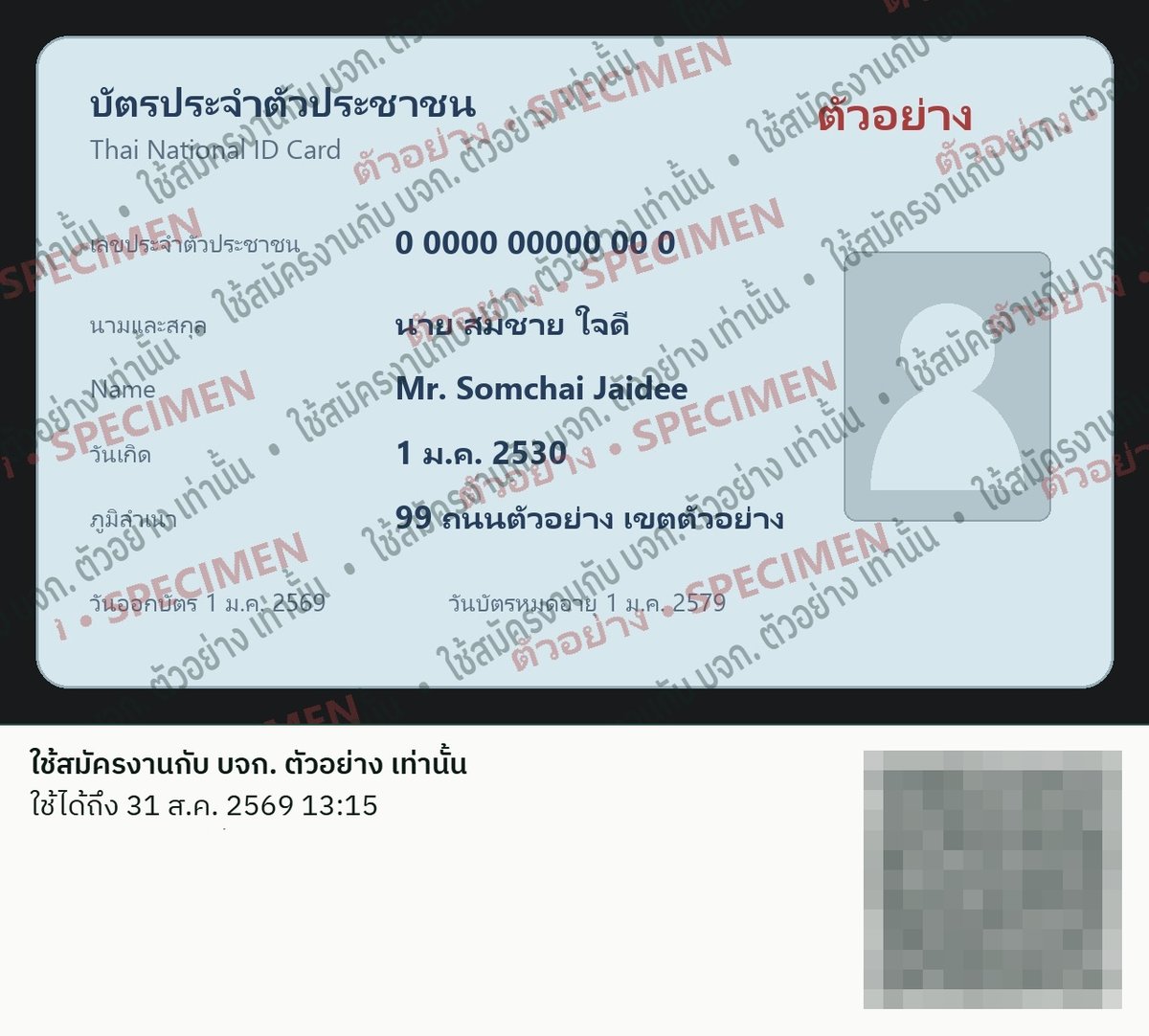
Thais have long written "for job application only" across photocopies of their ID card, because a loose copy can be used to open accounts, take loans, or register SIM cards in your name. This tool does the same thing digitally: it stamps a purpose and expiry across the image and signs it — recipients can verify it, forgers cannot alter it, and the image of your card never leaves your device.
Live demo coming online soon
Step 1
Choose your ID copy file
Pick a photo or PDF of the copy. The file opens in your browser only — nothing is uploaded, no text is scanned, and no system reads your name or ID number.
Selected file:
Step 2
Set the purpose and validity
Make the purpose as specific as you can — name the organisation you are handing it to, and end with "only". Choose the shortest validity that still works. Once the window passes, anyone who checks the record sees "Expired".
Step 3
Stamp the copy
Your browser stamps the purpose across the whole image, plus an information band below it: the purpose, the expiry, and a reserved QR zone that gets stamped at the signing step — the stamp cannot be cropped out, and any edit will fail the digital signature.
Step 4
Sign and download
The browser computes the SHA-256 fingerprint of the stamped file on your device, then sends just three values to be signed: the file fingerprint, the purpose, and the expiry. What comes back is a digitally signed record, bound to this one stamped copy — and a QR code carrying that record is then stamped onto the copy, so a recipient who scans it lands on the verification page with the record already loaded.
The signed record — always send it together with the stamped file
Download the stamped copy and keep a copy of the record for recipients who cannot scan — the two always travel together.
Verifiable for the whole window and 30 days after expiry
How to use it
Handing over the copy:
send the stamped file and the signed record in the same message.
For the recipient:
scan the QR on the copy — the verification page opens with the record loaded; press verify to see the signed purpose, expiry, and file fingerprint (or paste the record at veriv.org/verify).
Received it as a picture on your phone?
Open LINE's QR scanner (Home → Add friends → QR code) and tap the album icon to pick the saved image — the link appears ready to tap.
After the window:
the record reports "Expired" — a copy reused later carries no weight.
What this proves — and what it does not
It proves: this copy was released for this purpose, within this window, and not a character of the record has been altered.
It does not prove: the identity of the person who stamped it, or the authenticity of the card itself — the system never sees or reads the card. Recipients should still assess the document as they normally would.
During the trial period, records are signed with the VeriV demo key and remain verifiable for the whole validity window plus 30 days after expiry.
Privacy
The image of your card never leaves your device — stamping and fingerprinting happen entirely in your browser.
The server sees exactly three values: the cryptographic fingerprint of the file, the purpose, and the expiry. No name, no ID number, no image, no logging of what you type — and no fingerprint can ever be turned back into the image.
Curious how it works underneath
The same digital signature protects every kind of document
The mechanism that just protected your ID copy is the one VeriV applies to certificates, exam results, and industrial records.
See how it works